

If you search for your site and see nothing, one of these nine things is usually why.
A website not showing on Google is one of the most common, and most fixable, problems a site owner runs into. In almost every case it comes down to one of a few reasons: the site is too new, it hasn’t been submitted to Google, or a setting is quietly telling Google to stay away.
Below are the nine most common reasons for a website not showing on Google, how to check each one, and exactly what to do about it. Work through them in order and your site should start appearing in search.
The short answerYour site is usually missing from Google because it’s brand new, not submitted to Google Search Console, has no sitemap, is set to “noindex,” is blocked by robots.txt, or simply hasn’t been crawled yet. Fix the setting, submit the site, and it will appear, usually within days to a couple of weeks.
First, how to check if your website is on Google
Before fixing anything, confirm the problem. Go to Google and search:
- site:yourwebsite.com, if pages appear, your site is on Google. If nothing shows, it isn’t indexed yet.
- Check a single page with the Google Search Console URL Inspection tool, it tells you plainly “URL is on Google” or “URL is not on Google.”
Now let’s look at why your website is not showing on Google, and how to fix it.
1.Your website is brand new
Google doesn’t index a new site instantly. It has to discover, crawl, and then index your pages, which takes anywhere from a few days to a couple of weeks.
Fix: Be patient, and speed it up by submitting the URL in Google Search Console and clicking “Request Indexing.”
2.You haven’t added the site to Google Search Console
Search Console is how you tell Google your site exists and ask it to index your pages. Without it, you’re relying on Google to stumble across you.
Fix: Create a free Search Console account, add your site, and verify ownership. It’s the first step for any site that wants to be found.
3.No XML sitemap submitted
A sitemap is a list of all your pages that helps Google find and index them faster. Missing or unsubmitted sitemaps leave pages undiscovered.
Fix: Most SEO plugins (like Rank Math) create one automatically at /sitemap index.xml. Submit that link under Sitemaps in Search Console.
4.Your pages are set to “noindex”
A “noindex” tag tells Google to keep a page out of search, useful for private pages, but a disaster if it’s on pages you want found. It’s a very common accidental cause.
Fix: In your SEO plugin, make sure the page is set to “Index.” Also check Settings → Reading in WordPress that “Discourage search engines” is unchecked.
5.robots.txt is blocking Google
The robots.txt file can accidentally block search engines from crawling your site entirely. If it disallows everything, Google can’t see a thing.
Fix: Visit yourwebsite.com/robots.txt and make sure it isn’t blocking important pages. Search Console will also flag crawl blocks.
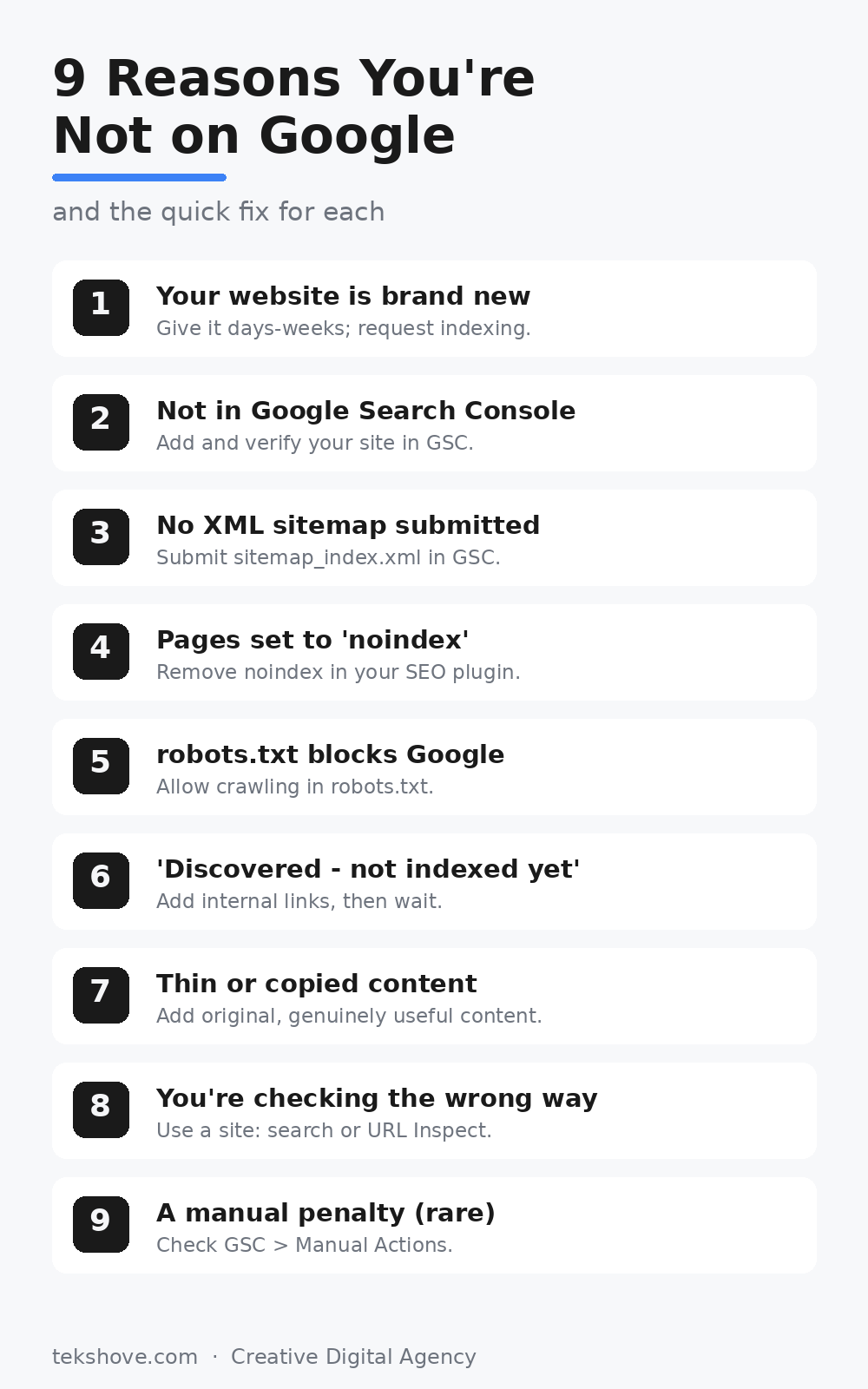
Save or share this checklist, the nine fixes at a glance.
6.“Discovered, currently not indexed”
Sometimes Search Console shows this message: Google has found your page but hasn’t indexed it yet. It’s normal for new sites and usually resolves on its own.
Fix: Add internal links to the page from other pages, make sure the content is solid, and give it time. Requesting indexing helps too.
7.Thin or copied content
Google may skip pages that have very little content or copy text from elsewhere. It wants pages worth showing to searchers.
Fix: Add original, genuinely useful content, aim for a few hundred well written words that actually answer what people search for.
8.You’re checking the wrong way
Searching your business name and not seeing your site doesn’t always mean you’re not indexed, you might just be ranking low. Being indexed and ranking on page one are two different things.
Fix: Use the site:yourwebsite.com search or the URL Inspection tool to confirm indexing, rather than judging by a normal keyword search.
9.A manual penalty (rare)
In rare cases, Google removes a site for breaking its guidelines (spam, buying links, cloaking). This is uncommon for normal business sites.
Fix: Check Search Console → Security & Manual Actions. If there’s a penalty, fix the issue and submit a reconsideration request.
How long until my website shows on Google?
Once your site is submitted and set to index correctly, most pages appear within a few days to two weeks. Newer sites and low authority sites take longer. Remember: a slow, heavy site is also harder for Google to crawl, if that might be you, see our guide on why your website is so slow. And appearing in Google is only step one, climbing the rankings comes from consistent, quality SEO over time.
Frequently asked questions
How do I get my website on Google for free?
Add your site to Google Search Console, submit your sitemap, and request indexing. It’s completely free, you never pay Google to appear in normal (organic) search.
Why is my new website not showing on Google?
New sites simply take time to be crawled and indexed. Submitting it in Search Console and adding a sitemap speeds this up considerably.
How long does Google take to index a site?
Usually a few days to two weeks. Requesting indexing and adding internal links can make it faster.
Does every page get indexed?
Not always. Thin, duplicate, or blocked pages may be skipped. Strong, original content on each page improves the odds.
Still can’t get found on Google?
If your website is not showing on Google after all this, TekShove can audit your indexing, fix the technical issues, and build the SEO that gets you ranking, not just listed.
Talk to Our Team
Tell us what you need help with and our team will get back to you.